Important Information for Customers Using webmail.pt.lu (IMAP/SMTP)
Microsoft has introduced significant changes in the new version of Outlook that affect customers who use IMAP (imap.pt.lu) and SMTP (smtp.pt.lu) to access their email accounts.
What happens when you use the new Outlook?
When you add a non-Microsoft email account (such as your pt.lu account) to the new Outlook, the application copies your emails, calendars, and contacts to Microsoft’s cloud servers. This includes:
- Your IMAP and SMTP login credentials (email username and password)
- All emails in your inbox
- Calendar and contact data
This process occurs automatically as part of Outlook’s synchronization feature.
Before:
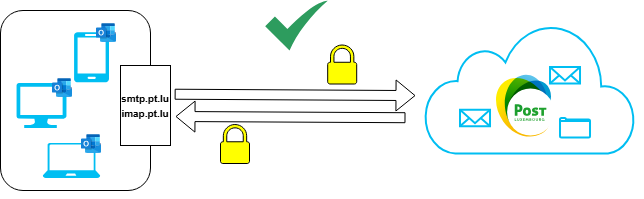
Your email client connected directly to POST servers via IMAP/SMTP.
Now:

The new Outlook intercepts credentials and mailbox data, synchronizing them with Microsoft servers before reaching POST.
Is webmail.pt.lu affected?
No. The web interface of webmail.pt.lu is not affected and does not share data with Microsoft.

Why is this important?
By using the new Outlook, you consent to Microsoft storing your mailbox content and credentials on its servers. POST Luxembourg has no visibility or control over this process and cannot influence Microsoft’s decisions regarding data handling.
What are your options?
- If you do not want your data copied to Microsoft servers, we recommend using an alternative email client that supports IMAP and SMTP without cloud synchronization, such as:
- Use Webmail
- Mozilla Thunderbird
- Apple Mail
- Other open-source or third-party email clients
- If you are comfortable with Microsoft storing your email data, you may continue using the new Outlook.
FAQ
Does POST share my data with Microsoft?
No. POST does not share your data with Microsoft. The transfer occurs because of Microsoft Outlook’s synchronization feature, which is entirely managed by Microsoft.
Is webmail.pt.lu affected?
No. The web interface of webmail.pt.lu is not affected and does not share data with Microsoft.
Can I prevent this in Outlook?
No. In the new Outlook, synchronization with Microsoft servers is mandatory for non-Microsoft accounts. If you do not want your data copied to Microsoft, you must use a different email client.